 Microsoft released their new remote desktop client for mac on October 17th, 2013. This comes after HLW Software Development (developer of iTap RDP for iOS, Mac and Android) announced they were discontinuing their products on October 8th.
This had us worried since we have multiple customers that use iTap on their Mac and iOS devices and we always have more customers that need to be set up. Since the iTap products were the only RDP apps for Mac and iOS that could work with a Terminal Server Gateway it didn’t us any other options. Luckily, Microsoft announced their new RDP clients, based on the iTap codebase, only 9 days after discontinuing the iTap products.
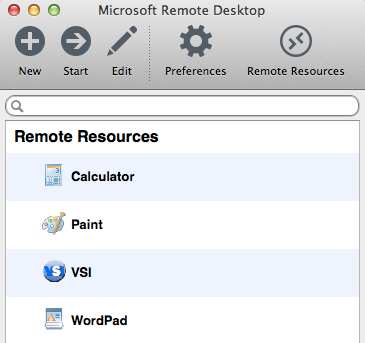 The new apps are not only a rebranding of the existing software, they contain a few enhancements. The greatest enhancement, for us and our clients anyway, is RemoteApp integration. That allows single apps to be run from a RDP session similar to what Parallels Coherence and VMWare Fusion Unity does for local VMs.
By clicking on Remote Resources you can enter the address of your RDWeb URL, your username and password and be presented with a list of published RemoteApps. This gets us one step closer to being able to recommend Apple devices to our clients without worrying about computability with Microsoft systems.
The Mac version can be found on the Mac App Store.